
A Facebook Group post reaches 40 to 50% of its members, where a Page post reaches about 1.4% of its followers. That reach is why a group is worth growing at all. The catch is that the same free reach makes a group worth flooding, so growing one and moderating one are the same job. Every setting named here is a real Facebook admin tool, with the limit Facebook actually enforces.

Make your group public, because only a public group's posts reach people who are not members
Privacy is the first setting you pick and the hardest one to reverse, and it decides whether Facebook can recruit for you.
- A public Facebook Group shows its posts to anyone, so those posts turn up in Facebook search and in the Groups tab of people who are not members.
- A private Facebook Group hides every post from non-members, leaving only the group name and description to do the recruiting.
- Discoverability is a separate switch from privacy, so a group set to Hidden cannot be found in search even when it is public.
- Facebook now lets an admin turn a private group public, but everything posted while it was private stays visible only to the members who were already there.
- Choose private only when the subject is something people will not discuss in public, because you are trading away Facebook's own recruiting to get it.

Name your group after what people search for, not after your business
The group name is the single piece of text that has to work in search, in a recommendation and on a friend's screen.
- People find a new group by typing the subject into Facebook search, and your business name is not the thing they type.
- A group name and description stay public even when the group is private, so they are doing the recruiting either way.
- Facebook recommends groups by interest and by what a person's friends have already joined, so a plain subject name helps the recommender as much as it helps search.
- Write the description in the words a member would use rather than the words your industry uses, because that text is searchable too.
| What you are writing | The version that loses | The version that wins | What the swap is worth |
|---|---|---|---|
| Group name | Vlix Community | Perth Sourdough Bakers | Large found by people searching the subject |
| Group description | A place for our customers | For home bakers in Perth swapping starter, tips and photos | Large searchable, and it tells Facebook the subject |
| A post | New blog post, 7 sourdough tips, link below | My starter died on day four. What killed yours? | Large gets replies instead of a scroll past |
| A rule | Be nice | No selling outside the Friday promo thread | Medium a rule you can point at when you remove a post |
| A promo | Buy my course, link in the comments | One comment each on the Friday promo thread | Medium keeps selling in one place instead of every thread |

Check how many people search a name on Google first, then count the Facebook groups using it
Facebook publishes no search numbers and never has, so the only real numbers come from somewhere else and get checked against Facebook afterwards.
- Start with Google, because Google publishes how many people search a phrase each month and Facebook publishes nothing at all.
- Type each phrase into Facebook's own search bar and read the suggestions it offers, which come from what people type on Facebook but are partly personalised to you, so read them as an ordering and never as a measurement.
- Filter that Facebook search to Groups and add up the member counts of the top five results, because somebody who joined a group is stronger proof of demand than somebody who typed a word.
- Copy the naming shape the biggest groups in your subject already use, and reject any name that only makes sense once you explain it.
Two warnings before you trust either number.
- Google demand and Facebook demand are not the same thing, because Google gets people fixing a problem on their own and Facebook gets people looking for others like them.
- A subject with no existing Facebook groups is usually a dead subject rather than an open goal, since somebody has almost certainly tried it already.

Ask all three membership questions, because they are your only filter before someone is inside
Facebook gives every group exactly three questions to ask a person before they join, and most groups use none of them.
- A Facebook Group can ask up to three membership questions, each limited to 200 characters.
- You can ask for a checkbox, a multiple choice or a written answer, and the written answer is the one that stops bulk spam accounts.
- Make one question a checkbox agreeing to the group rules, so nobody can claim afterwards that they had not read them.
- Admin Assist can automatically approve anyone who answered your questions, so the filter costs you nothing per person once it is set up.
- Admin Assist only approves a joining member when every criterion you set matches, so adding a second condition makes the filter stricter rather than looser.

Post a question rather than a link, because a question gets comments and a link gets scrolled past
Meta does not publish what makes a group get recommended, but it does publish what its Suggested Groups system tries to predict.
- One of the models Meta names for Suggested Groups predicts how likely a person is to comment in a group before it suggests that group to them.
- Most of what Meta says it looks at before suggesting a group describes the person being shown it, such as how many groups they are already in and whether their friends joined.
- A public group's posts can appear in the feeds of people who are not members, so one thread can reach strangers on its own.
- A link post ends the conversation, because there is nothing left for a member to reply to.
- A Facebook Group post costs 5 to 30 minutes to make, because it is a question, a poll or a short tip with no video to produce.
- Answer every reply on your own posts for the first few months, because a question nobody answers teaches members that posting here is a waste of time.

Read Group Insights for your popular days and times, then post in that window
Facebook measures your own members and hands you the answer, which beats any published best time to post.
- Group Insights shows total members, active members, popular days, popular times and your top posts.
- Popular times is measured from your own members rather than from an industry average, so it is the only posting time worth following.
- Age, gender, top countries and top cities only appear once the group has at least 250 members.
- Top contributors names the handful of members carrying the discussion, and those are the people to make moderators.
- Membership requests over time tells you whether a change you made actually brought people in.
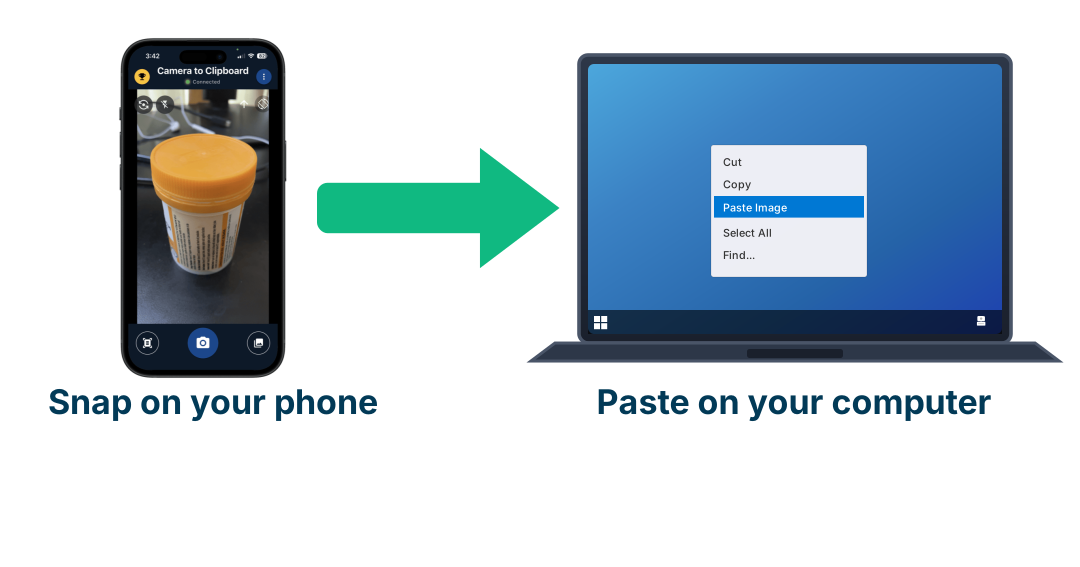
Use Camera to Clipboard to put phone photos into a group post on your computer
Group posts are written on a computer, where Admin Assist and Insights live, but the photos are on your phone. Camera to Clipboard, one of my own apps, takes the photo on your phone and puts it straight on your computer's clipboard, so you paste it into the post box without emailing it to yourself.
- The photo lands on your computer's clipboard as you take it, so the next thing you do is paste it into the group post box.
- There is no cable, no upload page and no emailing a picture to yourself to get it off the phone.
- A group post costs 5 to 30 minutes, and moving one photo by hand is a real slice of that.

Write your ten group rules before you open the doors, because ten is all Facebook gives you
Rules are not there to be read. They are there so that removing a post is a two second job instead of an argument.
- A Facebook Group can hold up to 10 rules, and that cap is a hard limit rather than a suggestion.
- Turn on the setting that makes a joining member agree to the rules, so the agreement is on record before their first post.
- Write each rule as the thing you will actually enforce, because one rule you ignore teaches members that none of the ten count.
- An admin can tag a specific rule in a comment, which turns a removal into a link rather than a debate.
- Spend two of the ten rules on how often a member may post and on selling, because those are the two behaviours that flood a group.

Let members post but approve each one, because volume grows the group and junk kills it
This one setting decides what your group becomes, and Facebook gives you three ways to set it.
| How you set posting | Posts Facebook can show a stranger | Competitors in your own group | Work it costs you | If you stop posting for a month |
|---|---|---|---|---|
| Only admins can post | Few only what you write yourself | None nobody else can post at all | None beyond writing your own posts | Dead nobody else can keep it alive |
| Anyone can post, nothing approved | Many every member adds to the pile | Every member can post their own links and offers | None until the spam starts | Alive members keep it running without you |
| Anyone can post, every post approved | Many the ones you let through | None that you did not allow yourself | Daily a review queue you have to read | Slower it runs, but the queue backs up |
- Post approval holds every post for an admin to read before any member sees it.
- An admin-only group gives Facebook one post a day to put in front of a stranger, where an open group gives it dozens.
- The thing to guard against is not members posting, it is members marketing, and post approval stops the marketing without stopping the volume.
- Admin Assist can decline any post linking to a site you name before that post ever reaches your approval queue.
- An admin-only group stops the day you stop, because nobody else is allowed to keep it going.
- Start with approval on for everyone and loosen it later, because you can open a gate at any time and you cannot unsend a spam post.

Let Admin Assist decline the link posts, because link spam is most of what floods a group
Admin Assist is a rules engine Facebook gives every admin free, and almost nobody turns it past the default.
- Admin Assist can automatically decline any post or comment that links to a site you name, which handles the repeat offenders by itself.
- It can also decline anything Facebook's systems rate as likely spam, and anything third-party fact-checkers have rated false.
- Admin Assist declines a post when any one of your criteria matches, which is the opposite of how it approves a joining member.
- Have it tell the author why the post was declined, so they fix it and repost instead of messaging you.
- It can remove a post once a number of members you choose have reported it, and turn comments off on a thread that is heating up.
- Read the Potential Spam folder every few days, because Facebook filters suspected spam out before you see it and it catches real members too.

Cap a flooding member at one post a day before you reach for a ban
The member posting eight times a day is usually enthusiastic rather than malicious, and Facebook has a setting for exactly that.
- Facebook lets you limit how many posts one member can publish per day and how many comments they can publish per hour, both for a length of time you choose.
- The limit is set on one person, so the group carries on normally for everybody else.
- Suspending a member stops them posting, commenting and reacting for a period you set, which is the step above a cap.
- Removing a member lets them rejoin later and banning stops them coming back, so save both for someone who broke a rule rather than someone who posted too much.
- A cap keeps your most active member and a ban loses them, and the person posting too often is usually one of your best contributors.

Give selling its own weekly thread, because banning it only moves it into the comments
Members will promote whatever the rules allow, so the choice is where the promotion goes, not whether it happens.
- A rule that bans selling with no alternative pushes the selling into replies under other members' posts, where it is harder to find and harder to remove.
- Admin Assist publishes a recurring post daily, weekly or monthly, so a Friday promo thread appears whether or not you remember it.
- Admins and moderators can schedule a single post, while only admins can create a recurring one.
- Post topics file posts by subject, up to 150 topics in a group, and an admin can add up to 5 topics to a member's post.
- Announcements pin a post to the top of the group for a period you choose, which is where the rules and the promo day belong.
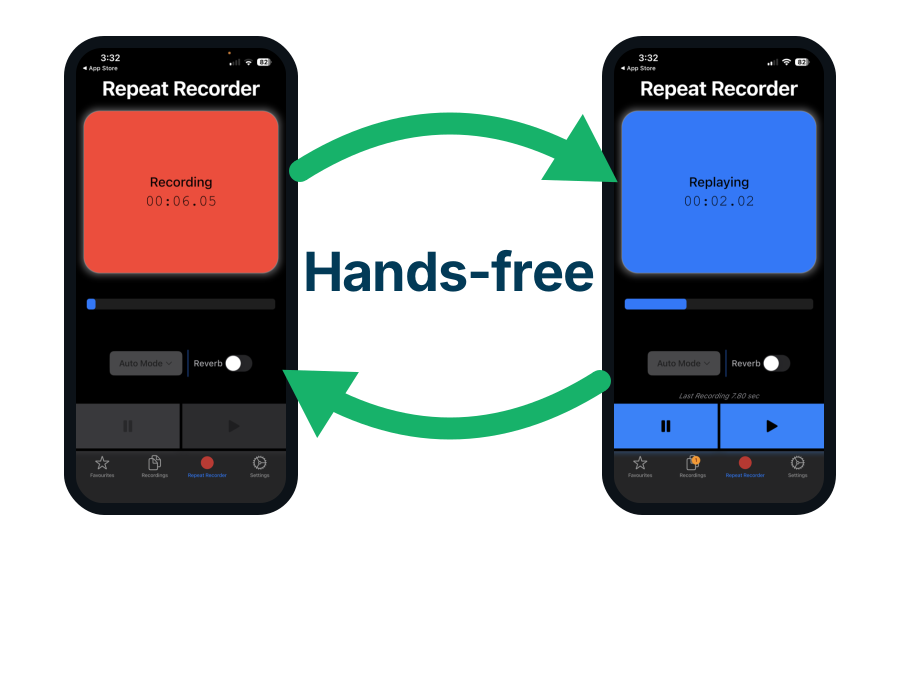
Use Repeat Recorder to rehearse the welcome video for your group
A welcome video that states the rules and the promo day removes most moderation before it happens, and it is the one video in a group worth doing twice. Repeat Recorder, another of my own apps, records you, plays the take straight back and starts recording again without you touching the phone.
- Repeat Recorder plays each take back automatically and then starts recording again, so you can run the same thirty second welcome five times without picking the phone up.
- Ten rules is a lot to say out loud, and hearing the take back is how you find the two that need rewording.
- Takes worth keeping go into favourites and into folders you name yourself, so the answer to the question every new member asks is already recorded.

Set keyword alerts, because nobody reads every post in a group that is growing
Past a few thousand members you stop being a reader of the group and become someone who gets told about it.
- Keyword alerts tell you when a member uses a word or phrase you chose, and Facebook puts no limit on how many keywords you add.
- Set alerts on your own brand name, on your competitors, and on the words that start arguments in your subject.
- Engagement alerts fire when a post passes a comment or reaction count you set, which is how you catch a fight while it is still small.
- An engagement alert only fires if the threshold is passed inside one hour, so a post gathering 100 comments over a week never triggers one.
- Higher Logic measured about 33% of members posting or commenting in communities under 5,000 people and about 10% in communities over 50,000, so a bigger group means more posts from a smaller share of members.

Pick the flooding tool that matches the problem, because most floods need a setting and not a ban
Each row is a real setting, where to find it, and what it still costs you after it is switched on.
| The problem in your group | The tool that fixes it | Where it lives | Work left after setup |
|---|---|---|---|
| Spam accounts joining | Three membership questions, with Admin Assist auto-approving the people who answer them | Group settings, then Admin Assist | None set once and it runs |
| Link spam posts | Admin Assist declining any post that links to a site you name | Admin Assist | None runs by itself |
| Arguments over what is allowed | Ten group rules, agreed to on joining | Group rules | None set once and it runs |
| Selling in every thread | A weekly promo thread published as a recurring post | Admin Assist | None runs by itself |
| One member posting all day | A daily post limit and an hourly comment limit on that member | The member's own menu | None set once per person |
| A fight in the comments | Suspend the member, or have Admin Assist turn comments off on reported posts | Member menu, or Admin Assist | None set once per person |
| A post you would not have allowed | Post approval, so nothing publishes until you press approve | Group settings | Some a review queue to read |
| Posts you would never see | Keyword alerts and engagement alerts | Moderation alerts | Some alerts to read daily |
| A feed nobody can search | Post topics, up to 150 in a group | The post composer | Ongoing tag posts as they arrive |
Conclusion: how to grow a Facebook group and stop the flooding
Twelve settings and habits, in the order you should switch them on. The growth half is what Facebook rewards, and the moderation half is what stops that reward being spent by somebody else.
Do these six things to grow the group
- Make the group public. Only a public group's posts reach non-members.
- Name it after the subject, not your business. The name is what people search for.
- Check the name on Google first, then count the Facebook groups using it. Facebook publishes no search numbers.
- Ask all three membership questions. They are your only filter before someone is inside.
- Post a question, not a link. A question gets comments and a link gets scrolled past.
- Post at the popular times in Group Insights. Those are measured from your own members.
Do these seven things to stop the flooding
- Write ten rules before you open the doors. Ten is Facebook's hard limit.
- Let members post but approve each one. Volume grows the group and junk kills it.
- Set Admin Assist to decline posts linking to a site you name. Link spam is most flooding.
- Cap a heavy poster at one post a day. Do that before you reach for a ban.
- Give selling its own weekly thread. A ban only moves it into the comments.
- Set keyword alerts on your brand and on the words that start fights. There is no limit on them.
- Suspend rather than remove. A suspension ends, and a removal loses the member.