Switched from Windows and reaching for Microsoft Paint? It is not here, and it never was. But the thing you actually want, a small app that opens instantly and lets you draw, crop, and label an image, absolutely exists on macOS. Here are the closest equivalents, honestly ranked.
Short version: there is no official MS Paint for Mac. The closest native equivalent is the free Paint Vlix (familiar toolbar, plus editable objects and unlimited undo). Preview is the built-in fallback for quick markup, and jspaint.app is a browser clone if you want the exact retro look for one job. 
Why there is no Microsoft Paint for Mac
Microsoft Paint has shipped with Windows for decades, but Microsoft has never released a Mac version, and it is not on the Mac App Store. So when people search for "MS Paint for Mac" they are really asking a different question: what is the app for Mac like Paint? The good news is that the answer is better than the original.
What is the Mac equivalent of Paint?
The closest Mac equivalent of Paint is Paint Vlix, a free Mac app built natively in Swift, so it opens instantly. You get the pencil, brush, shapes, lines, arrows, and text you remember, plus the two things MS Paint never had: every mark stays an editable object, and undo is unlimited.
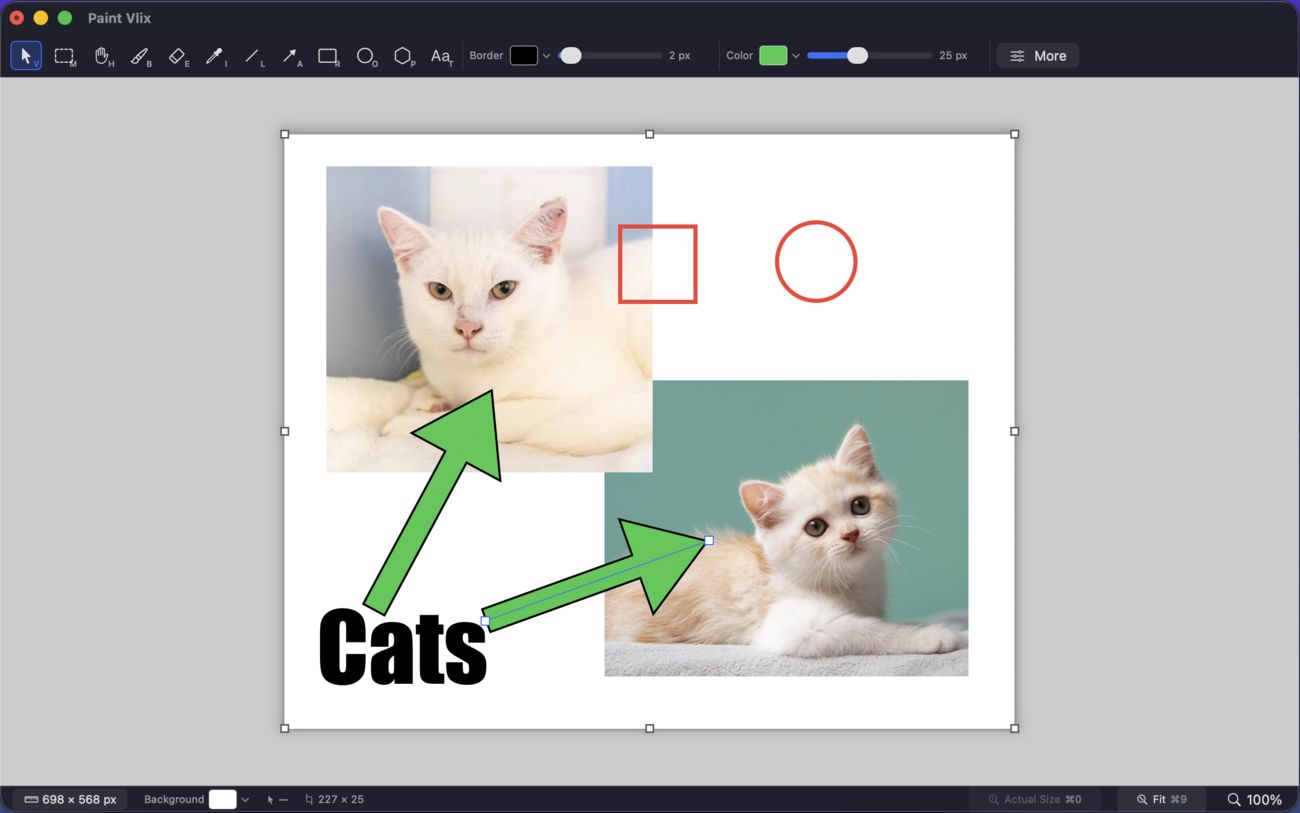
It is 100% free on the Mac App Store, with no in-app purchases, no subscription, and no account.
The Microsoft Paint alternatives for Mac, ranked
Every option below is genuinely free. They differ in what they are for, which matters far more than a feature count.
Best overall
1. Paint Vlix (free, native)
The closest thing to MS Paint that is actually built for macOS. You get the simple, familiar toolbar, but drawings stay as objects you can move and restyle instead of pixels that vanish the moment you click away. Built natively in Swift so it opens instantly, exports PNG and JPEG, and never asks you to sign in. This is the pick for most people who just want Paint back.
Built in
2. Preview (already on your Mac)
Preview's Markup toolbar covers the basics: shapes, arrows, text, a sketch tool, and cropping. If your need is a one-off annotation and you do not want to install anything, it is right there. The limit is that it is a viewer with markup bolted on, not a drawing app, and everything bakes into the image on save.
Browser
3. JS Paint (web clone)
The site jspaint.app recreates classic MS Paint faithfully, right down to the retro look, and runs in any browser with nothing to install. Perfect for nostalgia or a single quick doodle. It is a web page, though, so it is less convenient for files you work with often, and it is not a native Mac app.
Heavy duty
4. GIMP (free, powerful, complex)
GIMP is a free, full photo editor with layers, masks, and filters. It can do far more than Paint, which is exactly the problem if you only wanted Paint: it is a big download with a steep learning curve. Reach for it when you have outgrown a simple paint app, not before.
What about Paint.NET and Paint X?
A few names come up in the same searches, so to save you the trip:
- Paint.NET for Mac does not exist. Paint.NET is Windows only, with no Mac build.
- Paint X for Mac and similar App Store clones and similar App Store clones exist, but many lean on ads or upsells for basic features, so check before you commit.
Paint Vlix is the successor to Paintbrush
Paintbrush → Paint Vlix
For years, the free Paint-style app Mac users reached for was Paintbrush, a small open-source editor. It did the job in its day, but the project is now all but abandoned: no meaningful updates in years, and it only supports old versions of macOS. On a current Mac it often refuses to open or quits on launch. If you landed here because Paintbrush stopped working, that is why.
Paint Vlix picks up exactly where Paintbrush left off: the same simple, no-nonsense paint experience, but built for modern macOS, actively maintained, and free. It is the natural successor for anyone who misses Paintbrush, or MS Paint, on the Mac.
Paint Vlix vs Microsoft Paint
If Paint Vlix is going to be your MS Paint, here is how the two line up. It keeps everything you used Paint for, and adds what Paint never had.
| What you want to do | Paint Vlix | Microsoft Paint |
|---|---|---|
| Classic pencil, brush, shapes & text | ✔ | ✔ |
| Runs natively on macOS | ✔ | Windows only |
| Editable objects you can move later | ✔ | Pixels only |
| Unlimited undo and redo | ✔ | Limited |
| Rich text with fonts, outline & shadow | ✔ | Basic text |
| Rotate to any angle | ✔ | 90° steps only |
| Brightness, contrast & opacity | ✔ | Limited |
| Export PNG, JPEG | ✔ | ✔ |
| Free | ✔ | ✔ |
So which MS Paint equivalent should you pick?
- You want Paint back, natively, for keeps: Paint Vlix.
- You need one quick markup and nothing installed: Preview.
- You want the exact retro look for a laugh: jspaint.app in the browser.
- You have outgrown Paint and need layers: GIMP.