
The expensive part of influencer marketing is rarely the creator. It is the layer of tools, agencies and marketplaces stacked between you and the creator, each taking a cut for an introduction you can make yourself for free. This is the companion to my bigger guide on how to find influencers without overpaying, and it answers the question that one leaves open: once you have found a creator you like, how do you actually reach them, in a way that gets a reply? It leans hardest on YouTube, because that is where a sponsored placement costs the most, so cutting out the middle layer saves the most, and then covers TikTok, Instagram Reels and Facebook Pages and Groups. I use the small apps I make as the running example (Repeat Recorder, Paint Vlix and Camera to Clipboard). There is a free, fill-in-the-blanks message builder further down that writes the actual email or DM for you.
The short version: You do not need to pay a platform to contact a creator. On YouTube, there is no viewer DM, so email is the way in: open the channel's About tab on desktop and click “View email address” (behind a CAPTCHA, if they opted in), or read the business line at the bottom of recent video descriptions. On TikTok you get exactly one message to a non-follower, so make it count. On Instagram, cold DMs land in the hidden Requests folder and may never be seen, so use the profile's Email button too. On Facebook, Pages and niche Groups are for finding micro-creators, not for spamming. As a rule, DM the small creators (they run their own accounts) and email the big ones (managers do). Whatever the channel, a message that gets a reply is personalized, offer-first, one clear ask, and short, then one gentle follow-up a few days later. Use the builder below to generate yours.

Going direct gets the same creator with none of the markup
Marketplaces and discovery tools are genuinely useful when you want to search and vet creators at scale, and the find-influencers guide ranks them. But for the outreach itself, doing it yourself wins on the two things a small brand cares about most:
- Direct email and DM outreach costs nothing but your time. A direct email or DM has no marketplace fee, no subscription and no per-message credit. The only cost is your time, and at nano and micro scale that time is the best-paid work in the campaign.
- A direct deal has no platform cut, so the same budget buys more. A creator quoting you privately has no platform taking a cut, so the same budget buys more, or the same result costs less. You are also negotiating a real relationship you can repeat, not a one-off booking.
- A human message out-converts a templated blast. The tools that automate outreach also make it look automated, and creators delete automated pitches on sight. A note that clearly took two minutes of genuine attention is both cheaper and more effective than a sequence sent to five hundred people.
- Skipping paid tools still leaves you the free native creator marketplaces. Skipping the paid layer does not mean skipping every platform. TikTok Creator Marketplace, Meta's creator tools and YouTube Creator Partnerships are free to use, you only pay the creator, and they are worth using for first-party data and safe payment even when you found the creator yourself.
The platform sells you the introduction. But the introduction is a message you can write yourself, and the version you write by hand, for one specific person, is the version that actually gets answered.

Match the channel to the creator size
Before any template or timing trick, get this one thing right, because it decides whether your message is even seen by the person who can say yes. The right channel depends almost entirely on how big the creator is:
| Creator size | Who reads the inbox | Best first channel |
|---|---|---|
| Nano (1K to 10K) | The creator, personally | A DM often beats email; they reply themselves and read every message. |
| Micro (10K to 100K) | Usually the creator | DM or email both work; use the business email if they list one. |
| Macro (100K to 1M) | Often a manager or assistant | Email the business address; a DM is unlikely to reach the decision-maker. |
| Mega (1M+) | An agency or management team | Email the agency contact; expect a formal, slower process (usually not your market). |
- Small creators are reachable by DM because they run their own accounts. A nano creator sees their DMs, so a friendly, specific message gets a fast human reply. This is the tier a small brand should live in anyway, since it is the best value on cost per customer.
- Big creators route everything to a business email. Once someone is at macro scale, a manager filters their messages, so a DM pitch usually dies and email to the listed business address is the only realistic route.
- How to tell a creator is represented. The business email is an agency or management domain rather than a personal address, the profile says “for business inquiries contact…”, or a tool like Social Blade lists a network. Represented creators mean a higher floor and a slower process, which is usually a sign to concentrate on smaller creators instead.

How to find a YouTube creator business email
YouTube is where a sponsored placement costs the most per creator tier, so it is where cutting out the middle layer saves the most. It is also the platform with no direct-message system for viewers, which makes email the main way in. Here is where the email actually lives:
- The About tab “View email address” button (the primary method). On a desktop browser, open the channel, go to the About tab, and under Details click View email address. If the creator opted in, YouTube reveals a business email after a quick CAPTCHA to stop bulk scraping. Two things to know: it is typically shown on desktop, not the mobile app, so switch to a computer if you cannot find it, and not every channel exposes one, the absence just means they did not opt in.
- The video description business line. When the About tab has nothing, open a few recent videos and scroll to the bottom of the description. Creators often put a “Business inquiries: …” email there even when the channel page does not show one.
- Banner links, linked site and link aggregators. The links in the bottom-right of the channel banner point to the creator's other socials and website, where a contact or press page, a media kit, or a Linktree/Beacons page often carries the email or a booking form.
- A creator's other profiles often list a business email when the main one does not. A YouTuber's Instagram or TikTok bio frequently lists a business email or a “for collabs” link even when YouTube does not, so if there is no email anywhere on the channel, a short DM elsewhere asking for their best email for a paid collaboration is a reasonable last step.
- For bigger channels, expect a manager. An agency-domain email or a “represented by” note means you are writing to a team, so keep it professional and expect a slower, more formal reply.
Because there is no YouTube DM, do not try to reach a YouTuber through comments or the channel's community tab. Find the email, or find them on another platform and move the conversation to email. Everything about crafting that email is in the message section and the builder below.
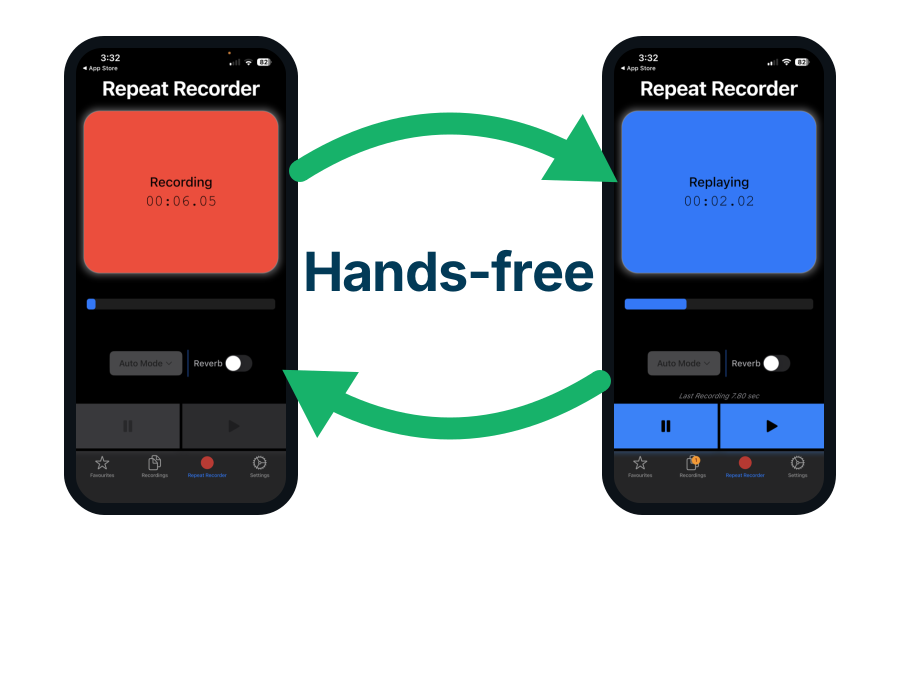
Use Repeat Recorder to rehearse a pitch call with a manager
Once a channel is big enough that the email lands with an agency, the deal stops being a thread and turns into a call, and what decides it is a thirty second answer to what exactly you are offering. That is one spoken paragraph you will give again to every creator on your list, and hardly anybody practises it once. Repeat Recorder, one of my own apps, records you, plays the take straight back and starts recording again without you touching the phone.
- Repeat Recorder plays each take back automatically and then starts recording again, so you can run the same thirty second offer ten times without picking the phone up. That is the entire app. It was built for speech rehearsal, language learning and vocal training, and saying an offer out loud until it is short is the same drill with different words.
- A YouTube placement costs more per creator tier than any other platform in this guide, which makes the call that agrees one the most expensive conversation on the page. Hearing your own take played back is what catches an offer that takes ninety seconds to state, and a manager who has to ask what you actually want is a manager who is already reading the next email.
- Takes worth keeping go into favourites and into folders you name yourself, which you can drag into whatever order you want. Nano, micro and mid tier creators need different money and a different ask, so a folder per tier means you rehearse the version that matches the call you are about to make.

On TikTok you get exactly one message to a non-follower
TikTok's audience is younger and reachable, but the DM system has a hard gate that most brands learn the hard way. Work with these mechanics rather than against them:
- Check a TikTok creator's bio first, most list a business email or link-in-bio. Many TikTok creators put a “For business inquiries: …” line, an email, or a link-in-bio tool (Beacons often includes a media kit and a collaboration form) right in the bio. If they tell you how they want to be contacted, use that method.
- TikTok gives you exactly one DM to a creator who does not follow you. If a creator does not follow you, TikTok delivers a single message to their requests inbox and blocks you from sending anything else until they accept or reply. So your first message has to be complete: personalized, offer stated, one concrete ask, no “hi, can I pitch you something?” opener that wastes the shot.
- Some creators cannot be DM'd at all. TikTok lets people restrict who can message them, so if there is no DM option, fall back to the bio email.
- TikTok Creator Marketplace is free. TikTok's own Creator Marketplace lets brands browse creators with real first-party data and pay safely, at no platform fee. It skews toward larger, enrolled creators, so it is a good vetting-and-payment layer rather than a complete substitute for finding nano creators in the app yourself.
- DM to open, email to close. Use the DM for the first, human contact, then move to email for rates, briefs and anything with an attachment.

Instagram cold DMs die in the message-request folder
Instagram is the platform where a cold DM most often vanishes without a trace, and understanding why tells you exactly how to get around it:
- A DM from an account the creator does not follow lands silently in Requests. A DM from an account the creator does not follow lands in the hidden Requests folder. It does not trigger a notification and is not marked as seen until they open it, so cold brand DMs routinely sit there unread for weeks or forever. This one mechanic explains most “they ignored me” stories.
- Use the profile's Email or Contact button. Professional (Business and Creator) accounts can show an Email or Contact button right on the profile, and many list an email in the bio or a link-in-bio media kit. That is the cleanest signal a creator accepts inquiries, and email skips the Requests-folder trap entirely.
- Reels creators are the same. There is no separate contact channel for Reels-first creators, you use the same profile buttons, bio and link-in-bio. Discover them through Reels, then contact via email or DM as their size dictates.
- Warm up the DM so it is not cold. Follow them, genuinely like and comment on a couple of posts first, and your name becomes familiar, which lifts a DM out of the anonymous-stranger pile. Best of all, combine channels: email first, then a short DM nudge a few days later referencing the email.
On Instagram the message you are proudest of can sit unseen in a folder the creator never opens. Assume the cold DM is invisible, and reach for the Email button, or warm the DM up first, instead of wondering why there was no reply.

Facebook is for finding niche micro-creators, not for spam
Facebook is less a first choice for creator outreach and more a place to find niche micro-creators and customers, if you respect how its communities work:
- Message a Page, and read the response badge. You can contact a creator or small brand running a Facebook Page through Page messaging. Look for the “Very responsive to messages” badge, which Facebook shows when a Page replies to at least 90 percent of messages within about 15 minutes. A Page with the badge is worth messaging; one without may be dormant.
- Facebook Groups are for finding micro-creators, not for pitching them. Niche interest Groups concentrate exactly the micro-creators and target customers a small brand wants. Watch who posts high-quality, on-topic content that gets real engagement, then check their profile and other socials, that is your shortlist.
- Read the group rules before you post anything. Many groups ban promotion outright or confine it to a designated self-promo thread or day. Breaking that gets you removed and remembered.
- Contribute before you pitch, and never cold-DM members. Be a genuinely helpful member first, then ask an admin about collaboration or promo permission rather than blasting the group. Cold-messaging members you met in a group reads as poaching, burns your reputation with the exact audience you wanted, and can get you banned.
- Why spamming backfires with a lasting cost. Groups are moderated communities. A spammy self-promo does not just get deleted, it associates your brand's name with “that person we removed,” in front of your ideal customers. That reputational cost outlasts any single post.
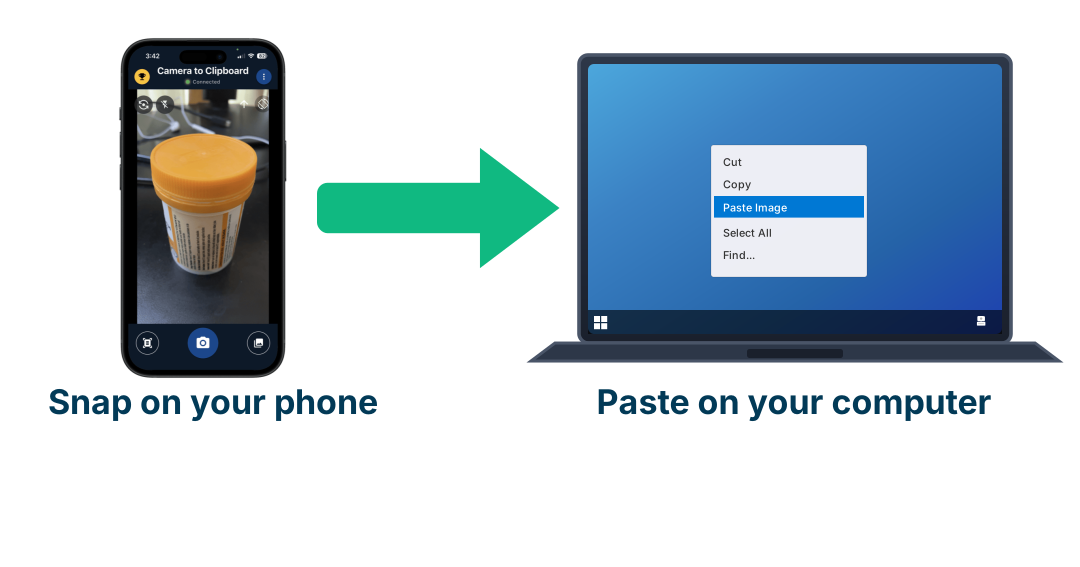
Use Camera to Clipboard to get a creator shortlist off your phone
Spotting micro-creators in a group happens on your phone, in the app, while you are scrolling past their posts. The shortlist you are building lives on your computer, and the gap between those two is where most of the names quietly get lost. Camera to Clipboard, one of my own apps, closes that gap in one step.
- You can send pictures already sitting in your phone's library, one or several at once, so a morning of screenshots arrives on your computer together. They land on the clipboard ready to paste, with no emailing them to yourself, no cable and no upload to somebody else's website in between, because the phone and the computer talk over your own local network.
- A shortlist built from group posts is only worth anything if you kept the post that put each name on it. The advice above is to watch who posts high-quality, on-topic content that gets real engagement and then check their profile, and the screenshot of that post is the evidence you will want a week later when you cannot remember why the name is there.
- Word and Google Docs take a pasted picture inline, so a shortlist document can carry the screenshot next to each creator's name. Photoshop and GIMP instead open it as a new layer or a new document. It arrives as an ordinary image on the clipboard, so anything that accepts a pasted picture accepts this one.

Email or DM, and why the honest answer is both
People want a single winner here, and the honest truth is that the vendor data is contradictory and mostly self-interested, so treat every percentage you read (including any you find quoted) as directional, not fact. What the sources do agree on is more useful than a number:
- Email is the professional channel for anything serious. Rates, briefs, contracts, a media kit, an attachment, all of that belongs in email, and larger or represented creators expect it. Its weakness is that it is easy to ignore, so it needs a strong subject line and a follow-up.
- A DM is best for being seen fast by a small creator. Nano and micro creators live in their DMs and reply personally, so a good DM gets a quick human answer, as long as it clears the Instagram Requests folder and the TikTok one-message gate described above.
- Outreach after you have genuinely engaged with a creator beats cold contact. The one thing every source agrees on is that outreach after you have genuinely engaged with a creator, or an inbound reply to a creator who already knows you, converts far better than a cold approach. Follow, engage, then reach out.
- Referencing a specific piece of a creator's work multiplies your reply rate. A message that references a specific piece of their work dramatically out-performs a generic one, by several times over in every study that looked, which is a far bigger lever than email-versus-DM.
- Email first for the detail, then a short DM a few days later. The reliable pattern is email first (for the record and the detail), then a short, friendly DM a few days later that references the email. Two light touches on two channels, both personalized, beats hammering one.

A message that gets a reply is short and offers first
Whatever the channel, the anatomy of a message that earns a reply is the same, and it is short. The builder below assembles all of this for you, but here is what it is doing:
- Open by naming a real video or post of theirs, never "I love your content". Open by referencing a real piece of their work (name the video or post and one true detail), not “I love your content.” This is the single load-bearing part: it proves you are a human who actually looked, and it is what separates a reply from a delete.
- Say what the creator gets in the first message, before asking for anything. Say what is in it for them, a free product, a flat fee, an affiliate cut, plainly in the first message. Making a creator ask “what's the budget?” is how deals stall.
- Propose one concrete deliverable, not "let's collaborate". “A 30 to 60 second mention in an upcoming video” beats “let's collaborate.” A single, easy-to-evaluate proposal gets a yes or no; a vague one gets ignored.
- End the message with a single yes or no question, not a list of options. End with a single yes/no question (“Open to it?”), not a list of options. One ask, one decision.
- Keep an outreach email to 60 to 120 words and a DM to four sentences. An email around 60 to 120 words, a DM two to four sentences. If it needs scrolling, it is too long. Send the deck and the details only after they reply.
- Put their name first in the subject line. This is the highest-leverage word in the whole email: seeing their own name is the single biggest thing that makes a person open a message, so lead with it. “Alex, a paid collab with Vlix?” gets opened; “Collaboration opportunity” is the subject line of an email nobody opens. Keep it short (under about 45 characters so it does not truncate on a phone) and specific: name first, then the offer. Be straightforward, not clever or vague, curiosity-gap subject lines read as spam to a creator who gets twenty pitches a day.
Fill in the blanks and copy a message that works
Fill in the fields and the builder writes a ready-to-send message for you, in the reply-getting shape above. Switch between an email and a DM, pick how you want to pay, then copy the subject and the body straight to your clipboard. Everything is generated in your browser; nothing is sent or stored.

When to send, how to follow up, and what gets you ignored
The last few percent is timing, a follow-up, and not tripping the filters that bin you before a human reads it. That grew into its own page, with a free interactive tool that detects your time zone and converts the ideal send windows into your own local time (because the best moment is set by the creator's clock, not yours), plus a live “is now a good time?” readout, the best days to send, how to follow up without being annoying, and the deliverability mistakes to avoid.
Open the free tool: The Best Time to Contact Influencers →
Detects your time zone (or defaults to Perth), converts the ideal windows to your local time, and remembers your choices.
How to pay once you have agreed a deal, and who pays first
Once a creator says yes, the awkward question is money: do you pay first, do they post first, or do you meet in the middle? For a private deal with someone you have no history with, there is a normal answer, and it is built to protect both sides.
The norm for a direct deal is a 50/50 split
- 50% up front, 50% on delivery. A deposit when they agree, the rest when the content is posted or approved. This splits the risk so neither side is fully exposed, and it is what most nano and micro deals settle on.
- Gifting: product first, post after. With a free-product deal you send the product first. It is the payment, so there is no cash to lose, only the cost of the item.
- Small flat fees are often paid in one go. Under roughly $100, people usually skip the split and just pay on delivery, or fully up front, because the amount is too small to bother halving.
The full menu, from most risk on you to most on the creator
- Paying 100% up front puts all the risk on you, so save it for creators you trust. All the risk is yours. Creators love it, but you would only do this once you already trust them.
- 50/50 split (deposit plus on delivery). The fair middle ground, and the default for direct nano and micro deals.
- Paying 100% on delivery puts all the risk on the creator, so most will refuse. All the risk is the creator's, so cautious or bigger creators will not accept it cold, because “fake brand wants free work” is a scam they see often.
- Net-30 after the post goes live is the norm with larger creators and agencies. Common with larger creators and agencies: they post, invoice you, and you pay within 30 days. This is a professional norm, not a red flag.
- Escrow (a platform holds the money). A third party holds the cash and releases it on delivery. This is exactly why marketplaces exist: they sell you the trust for a fee.
The creator is often the more nervous one
You worry about paying and getting nothing. The creator worries about delivering and never getting paid, and about brands that turn out to be fake. So you are both vetting each other, and the fastest way to a yes is to make yourself easy to trust.
- How you check the creator. Run the free fake-follower and engagement checks from the find-influencers guide, ask for one or two past brand deals, and look for a media kit or testimonials.
- Make yourself look trustworthy with a real site, a real email and a clear brief. A real website and product, a professional email (not a brand-new burner), a clear and specific brief, and offering the deposit yourself. Paying half first on a small deal instantly marks you as the real, serious party.
How to de-risk a first deal in practice
- Start with one post, because a first creator deal is a test. One post first. A first deal is a test, not a marriage; prove it works, then scale.
- Put the deliverable, timeline, amount and usage rights in writing. A short note you both agree to, stating the deliverable, timeline, amount, when each half is paid, and usage rights. At this scale an email you both reply “agreed” to is enough.
- Pay by PayPal Goods and Services or escrow, never by bank transfer. PayPal Goods and Services (not Friends and Family) gives buyer protection; a marketplace gives escrow; a bank transfer gives neither.
- Offer to pay half up front on a small deal, it costs little and wins trust. On a $50 to $200 nano deal, paying 50% up front costs you little and wins trust fast, which gets you more yeses.
The default that works: for a first-time nano or micro deal, say “happy to do 50% now and 50% once it is live,” or lead with gifting. It is the norm, creators expect it, and it protects you both, which is exactly what turns a cold pitch into a deal that actually happens.
Conclusion: how to contact influencers, in one glance
- Reaching a creator yourself by email or DM costs nothing but your time, so the marketplaces, tools and agencies in between are the expensive part of influencer marketing, not the creator. A creator quoting you privately has no platform taking a cut, so the same budget buys more, and the free native tools (TikTok Creator Marketplace, Meta's creator tools, YouTube Creator Partnerships) are still worth using for vetting and safe payment.
- Who reads the inbox decides the channel, so DM nano and micro creators who run their own accounts and email macro and mega creators whose managers do. YouTube has no viewer DM at all, so the business email on the desktop About tab or in recent video descriptions is the only way in. TikTok allows exactly one message to a non-follower, and Instagram cold DMs land in the hidden Requests folder, so on both the first message has to be complete on its own.
- A message that names a real video or post of the creator's own gets several times the replies of a generic one, so write every message by hand. Keep an email to 60 to 120 words and a DM to two to four sentences, lead with what the creator gets, ask one yes or no question, and follow up once. On a first small deal, offer 50% up front and 50% on delivery, which is the norm and marks you as the serious party. Use the builder to assemble it.