
You already know how to memorise a speech, because you have done it a hundred times with song lyrics you never sat down to study. You just heard them over and over. The best way to memorize a speech uses that same trick on purpose: record the speech in your own voice and replay it on a loop until it goes in by ear. That record-and-replay loop is exactly what the free Repeat Recorder app was built for.
The quick answer: the best way to memorize a speech is to record it in your own voice and replay it on a loop, hands-free, while you commute or walk, so you learn it by ear without trying. Then lock the order with three well-known memory tricks: chunk the speech into sections, use a memory palace to fix their sequence, and review at increasing intervals instead of cramming. Learn the structure, not every word. Repeat Recorder records each take and loops it back on its own, so the listening does itself. 
The best way to memorize a speech
Most advice tells you to read the speech over and over off a page. That is the slow way, because silent reading uses your eyes and skips the part of your brain that will actually run the show on the day: your ears and your mouth. The best way to memorize a speech is to turn it into sound you have heard so many times it feels like a song. Record the whole thing in your own voice, then put it on a loop and let it play while you do something else. You are not staring at it, you are marinating in it.
This works because hearing your own voice say the words repeatedly builds the same effortless recall you have for a chorus. By the third or fourth commute, you will find yourself finishing your own sentences before the recording does. That is the moment the speech has moved from something you are reading to something you know.
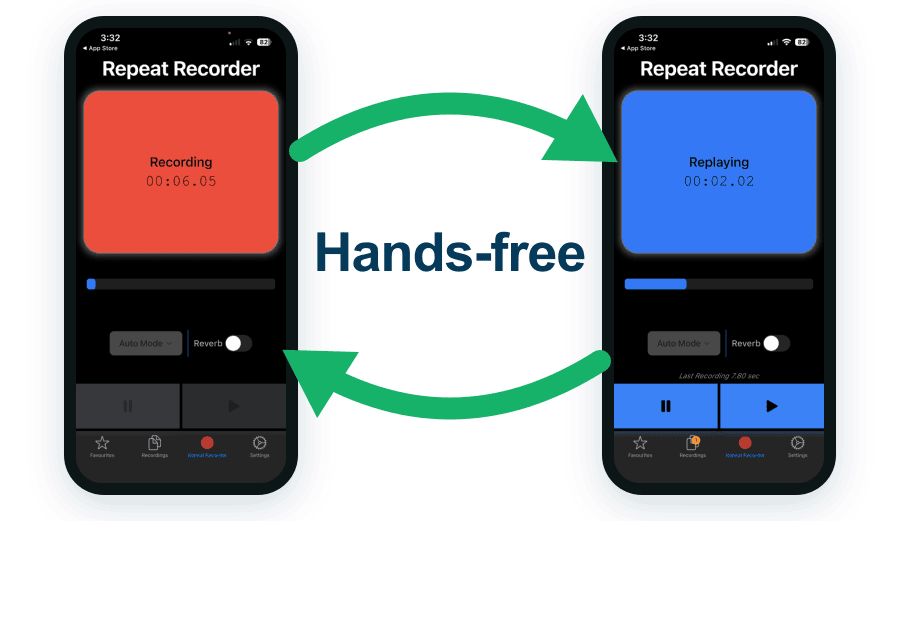
The record and replay loop in Repeat Recorder: speak a line, hear it back a second later, then go again.
Tips for memorizing a speech
Listening on a loop does the heavy lifting, but a few classic techniques make it stick faster and stop you freezing if a line slips. These tips for memorizing a speech all work best layered on top of the record-and-replay habit, not instead of it.
- Chunk it into sections. Break the speech into a handful of chunks: opening, two or three main points, closing. It is far easier to learn six small pieces than one wall of text, and if you lose your place you only lose one chunk, not everything.
- Build a memory palace. The method of loci, a memory palace, is the oldest trick there is: mentally place each chunk in a room of a house you know well and walk through in order. The order of the rooms becomes the order of your speech, so you never blank on what comes next.
- Review with spaced repetition. Cramming the night before fades fast. Spaced repetition, reviewing at increasing intervals, today, tomorrow, two days later, fixes the speech far more firmly for the same total effort.
- Learn the structure, not every word. Memorise the shape of the argument and the transitions between chunks so you always know what comes next. Then the exact wording can flex. One forgotten sentence should never derail the whole thing.
- Say it aloud, do not read it silently. Speaking the words trains your mouth to make them, which is what you will need at the podium. Reading in your head trains nothing you will actually use.
Memorize by ear, not just by reading
The reason the recording method beats re-reading is that a speech is something you perform out loud, so it should be learned out loud. When you record yourself and listen back, you memorise your own rhythm, your own pauses, and your own emphasis, all the things a page cannot show you. You can push this further with speech shadowing: play your recording and speak along with it a half-second behind, matching its pace and phrasing. Shadowing your own take welds the words to the way you say them, so on the day your mouth already knows the path.
An ordinary voice recorder makes this tedious. You record, then hunt for the file, press play, wait, and the moment is gone. Repeat Recorder removes that dead time: you speak, and a second later your take plays back on its own, and you can set it to loop. Because automatic mode needs no tapping, you can rehearse while driving, walking, or doing the dishes, not only at a desk.
The Repeat Recorder workflow
Here is the practical loop that turns a written speech into one you can deliver from memory:
- Record each section as a separate take, so a stumble means redoing one chunk, not the whole speech.
- Save the takes into named folders, one folder per section, so the order is baked into how they are stored.
- Set the replay to loop and let a section play back to you on repeat while you go about your day.
- When one part keeps slipping, drill that single chunk on its own loop until it sticks, then fold it back in.
Preparing for an impromptu speech
Not every speech comes with a script. For an impromptu or off-the-cuff talk you cannot memorise words you have not written, but you can memorise a structure to hang new words on. Keep a simple frame in your head, point, reason, example, restate the point, and you will always know where you are going next. Rehearse that frame the same way: record yourself improvising a short talk on a random topic, listen back, and hear where you rambled or froze. A few rounds of that and the frame becomes automatic, so when you are put on the spot your mouth reaches for a shape it already knows.
Why Repeat Recorder beats the voice recorder on your phone
Your phone already has a voice recorder, and it is fine for capturing a memo. For memorising a speech it fights you, because that is not one recording, it is a set of sections you want to loop, organise, and hear back the instant you finish.
- Instant replay, a second after you stop, with no file to find.
- Hands-free automatic mode, so you can rehearse on a commute or a walk.
- Loop a section once, a set number of times, or until you stop it.
- A countdown before recording, so you get a breath to prepare.
- Named folders, one per section of the speech, so the order is built in.
- Reverb to hear how a line would sit in the room you will deliver it in.

| For memorising a speech | Repeat Recorder | Phone voice recorder |
|---|---|---|
| Records your voice | ✔ | ✔ |
| Plays each take back automatically | ✔ | Find the file, press play |
| Hands-free, no tapping | ✔ | Tap to record and to play |
| Loop a section as often as you want | ✔ | One play at a time |
| Countdown before recording | ✔ | Starts immediately |
| Save takes into named folders | ✔ | One flat list |
| Reverb to simulate a room | ✔ | Dry recording only |
| Free | ✔ | ✔ |
Which speeches this suits, and a simple routine
- A wedding or best man speech: record it in sections, loop it on the drive to work, and arrive at the day knowing it cold.
- A class presentation or exam viva: chunk it by slide or topic, one folder each, and drill the one that keeps slipping.
- A work pitch or conference talk: learn the structure and transitions so you can flex the wording to the room.
- Lines for a play or an audition: shadow your own recording to lock the rhythm and the cues.
A simple routine: on day one, record the whole speech in sections and listen through twice. Each following day, loop it once on your commute, then run it once from memory and re-record only the chunks you fumbled. Spread across a few days, that is all it takes for the words to feel like yours.