
Most public speaking advice tells you what to do on stage. This is about what to do beforehand, because that is where a good talk is actually made. The single most useful tip is the one almost everyone skips: rehearse out loud, not in your head. Reading your notes silently feels like practice, but it hides every problem your audience will hear. The way to fix that is a loop the free Repeat Recorder app was built for: say a passage, hear it back, adjust, and go again.
The quick answer: the best public speaking tip is to rehearse out loud, not in your head, because silent rehearsal hides your filler words, rushed transitions, and sentences you never finish. Know your opening cold, use short sentences, pause instead of saying "um", slow down, and breathe. Treat the nerves as normal energy to channel. Then do the thing that ties it together: record a passage, listen back, and say it again until it lands. Repeat Recorder plays each take back a second after you speak, so you hear the talk the way the room will. 
Rehearse out loud, not in your head
When you rehearse a talk in your head, your brain quietly smooths over the rough edges. It skips the awkward transition, finishes the sentence you would have trailed off on, and never once says "um". None of that survives contact with an audience. The only way to find those problems is to speak the words out loud, at full voice, exactly as you will on the day.
Saying it out loud is only half of it. The other half is hearing yourself back, because you cannot judge your own pacing while you are busy producing it. Record a passage, play it, and you will hear the rushed run-on, the filler word you did not know you leaned on, and the point that took three sentences when it needed one. That gap between saying a thing and hearing it is where a talk gets better, and closing it fast is the whole reason to record instead of just reciting.
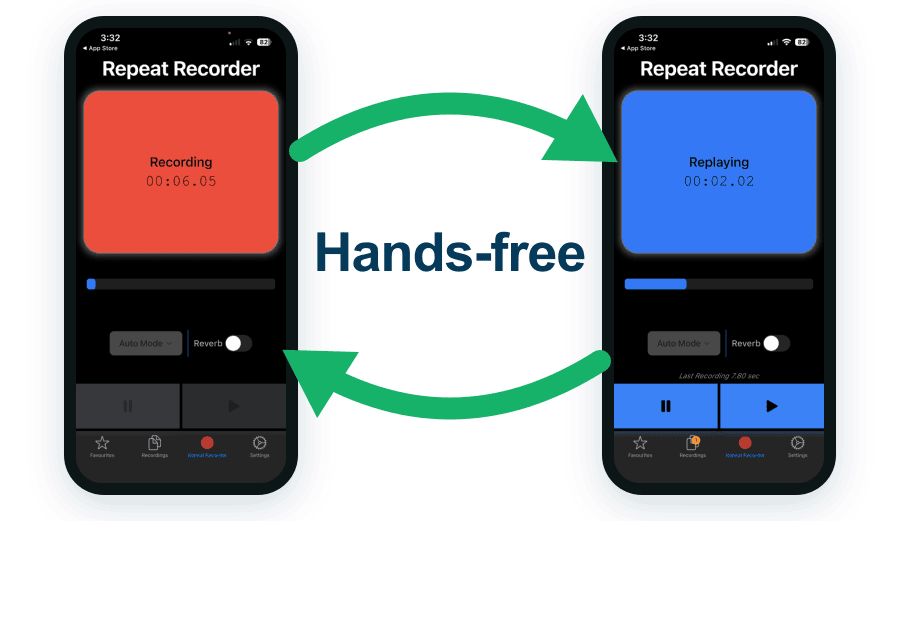
The record and replay loop in Repeat Recorder: speak a line, hear it back a second later, then go again.
7 tips to overcome your fear of public speaking
Nervousness before a talk is so common it has a name, glossophobia, the fear of public speaking. It is not a flaw and it never fully disappears, not even for professionals. The goal is not to feel calm, it is to be prepared enough that the nerves have nothing to feed on. These seven habits do most of the work.
- Know your opening cold. Rehearse the first thirty seconds until you could say them in your sleep. Once the start runs on autopilot, the nerves fade and the rest follows.
- Use short sentences. Long, subordinate-clause sentences are easy to write and hard to say. Break them up. Short sentences are easier to breathe through and easier to follow.
- Pause instead of saying "um". A filler word fills a silence you could have owned. A deliberate pause reads as confidence. You will only catch your own "ums" on a recording.
- Slow down. Nerves speed everyone up, and fast talking is harder to follow and sounds anxious. If pace is your main issue, there is a whole method in how to stop talking too fast.
- Make eye contact. Pick a few friendly faces around the room and speak to them, not to the back wall. It steadies you and connects the talk to real people.
- Breathe. Slow breaths from the diaphragm before you start, and full breaths between sentences, keep your voice from thinning out and your mind from racing.
- Rehearse out loud, more than you think you need to. Familiarity is the antidote to fear. The more times you have already heard yourself deliver the talk, the less new the moment feels.
If speaking with authority is what you are really after, the tone and delivery side is covered in how to speak clearly and confidently. Groups like Toastmasters International exist precisely because reps in front of a friendly room are the fastest way to get comfortable.
Tips for an impromptu speech
Being asked to "say a few words" with no warning is the version of public speaking people dread most, because there is nothing to memorize. You cannot script an impromptu speech, but you can rehearse its shape until a decent one comes out under pressure.
- Lead with your point. Say the one thing you want them to remember first, then support it. Do not save it for a big finish you might never reach.
- One reason, one example, stop. A short, finished answer sounds more confident than a long one that wanders and fades out.
- Rehearse the likely questions. You usually know roughly what you might be asked. Practise one or two sentence answers out loud, play them back, and tighten them. When the moment comes, you are recalling, not inventing.
- Buy a breath, not a filler. A two second pause to gather your thought beats "um, so, yeah". Silence is fine. It reads as thinking, which is what you are doing.
The record-and-replay loop is unusually good for this, because you can fire off a likely question, answer it cold, and hear immediately whether you led with your point or buried it. Same skill as voice acting for beginners: hitting a line convincingly on the first take, which is exactly what an impromptu answer demands.
How to calm your nerves before a speech
The minutes before you speak are when the adrenaline peaks. The trick is not to fight it but to give it somewhere to go. A racing heart and a bit of a shake are the same physical energy that makes a talk feel alive, once you stop reading them as a threat.
- Breathe long and slow. A few slow breaths, longer on the exhale than the inhale, tells your body the danger is not real and settles the shake.
- Warm up your voice. A cold voice cracks and sits high. Hum a little and say your opening lines quietly beforehand so the first words come out full, not thin.
- Run your opening once. Not the whole talk, just the first thirty seconds you already know cold. Landing the start is what breaks the fear.
- Reframe the feeling. "I am nervous" and "I am excited" are almost the same body state. Naming it as energy, not fear, changes how you carry it on stage.
Every one of these works better if the talk is genuinely familiar, and the fastest route to familiar is having heard yourself do it. If your goal is a steadier, warmer instrument overall, the exercises in how to improve your speaking voice build the voice these tips rest on. And if you have lines to lock down, how to memorize a speech covers getting them off the page and into your head.
Practise anywhere
The reason most people do not rehearse out loud is friction. Sitting at a desk reciting into a phone feels awkward, and a normal voice recorder turns every take into a chore: stop, find the file, press play, and by the time it starts you have forgotten what you were fixing.
The headline use case for Repeat Recorder removes that friction entirely. Put it in automatic hands-free mode and rehearse out loud in the car on your commute. You speak a passage, hear it back a second later, fix the pacing, and go again, all without touching the phone or looking at a screen while driving. A dead commute becomes the best rehearsal room you have.
Why Repeat Recorder beats the voice recorder on your phone
Your phone already has a voice recorder, and it is fine for a quick memo. For rehearsing a talk it fights you, because rehearsal is not one recording, it is dozens of short takes you want to hear back the instant you finish.
- Instant replay, a second after you stop, with no file to find.
- Hands-free automatic mode, so you can rehearse on a commute or a walk.
- Loop a passage once, a set number of times, or until you stop it.
- A countdown before recording, so you get a breath to prepare your opening.
- Named folders for the talk or the questions you are drilling this week.
- Reverb to hear how a line would carry in a room with some space in it.

| For rehearsing a talk | Repeat Recorder | Phone voice recorder |
|---|---|---|
| Records your voice | ✔ | ✔ |
| Plays each take back automatically | ✔ | Find the file, press play |
| Hands-free, no tapping | ✔ | Tap to record and to play |
| Loop a passage as often as you want | ✔ | One play at a time |
| Countdown before recording | ✔ | Starts immediately |
| Save takes into named folders | ✔ | One flat list |
| Reverb to simulate a room | ✔ | Dry recording only |
| Free | ✔ | ✔ |
A simple rehearsal routine
- One minute: hum and say your opening lines to warm up, recorder running.
- Two minutes: say your opening out loud on full breaths, listen, cut the filler and fix the rushed line, repeat.
- Two minutes: answer the two questions you are most likely to get, play them back, and tighten each to lead with the point.
Five minutes a day of rehearsing out loud, with feedback, beats an hour of reading your notes in silence. The confident version of your talk is a handful of honest, out-loud repetitions away.