
Voice acting is not a talent you either have or you do not, it is a skill you build one take at a time. The starting point is simple: get a script, read a line, hear it back, and try the read a different way. That read-hear-adjust loop is the whole craft in miniature, and it is exactly what the free Repeat Recorder app was built for.
The quick answer: to start voice acting, grab any free script (a public-domain book, an advert you can imitate, or a line from an animation or video game), read one line, hear it back, change one thing about the read (pace, emphasis, character or energy), and go again. Save your best takes into folders and you have the start of a demo reel. You cannot direct your own performance without hearing it back, and Repeat Recorder plays each take back a second after you finish, so the gap between reading and hearing disappears. 
What voice acting and voice-over actually are
Voice acting is performing a character or a piece of copy with your voice alone, with no face and no body language to lean on. Everything the listener feels has to come from the read: the pace, the emphasis, the energy, the accent, the age of the character. Voice-over is the narration side of the same craft, the voice you hear over an advert, an explainer, an audiobook or a documentary. As a beginner you do not need to pick a lane. You need reps, and reps mean reading lines out loud and, crucially, hearing yourself back so you can tell what actually landed.
Where to find voice acting scripts
You do not need to pay for a script to practise. Free practice material is everywhere once you look for it, and any few sentences will do:
- Public-domain books give you free narration to practise voice-over on. Read a paragraph as an audiobook, warm and unhurried, then read it again as if you were telling it to a child.
- Adverts you already hear are commercial reads you can imitate. Play a spot you like, then record yourself doing the same copy from memory and compare your energy to the original.
- Animation and video-game lines are character work. Pick a line with a strong emotion behind it and try it three ways: angry, then scared, then trying to hide both.
The goal is not to find the perfect voice over script, it is to have something in front of you so you can start the loop. A grocery list read with real intent teaches you more than a great script read once and never heard back.
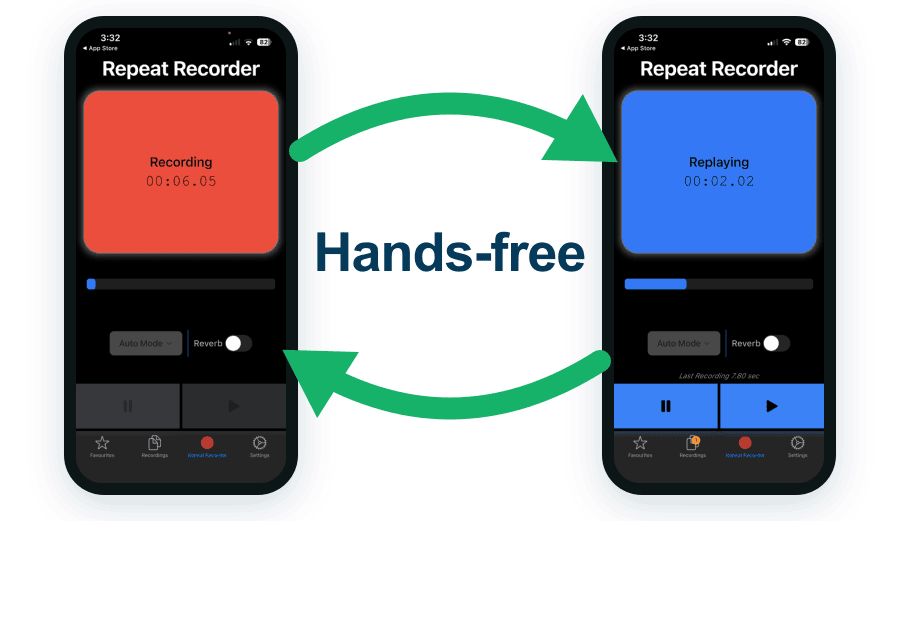
The record and replay loop in Repeat Recorder: speak a line, hear it back a second later, then go again.
Voice acting training you can do at home
The core of any voice acting training is the loop, and it costs nothing: read a line, hear it back, adjust the read, and go again. What you adjust each time is the whole skill:
- Pace. Read the line fast, then slow. Beginners rush almost every time and only notice when they hear it back. Space is a performance choice, not dead air.
- Emphasis. Take one sentence and stress a different word on each pass. "I never said she took the money" means six different things depending on the word you lean on. Try them and hear how the meaning moves.
- Character. Read the same line as a tired parent, then a game-show host, then a villain. You are learning how much your voice can bend.
- Energy. Match the read to the copy. An advert for a sports drink is not read at the same level as a meditation app. Record both, hear the difference, and calibrate.
Try each version, hear it back immediately, keep the one that worked, and drop the rest. That is training. Doing it with an ordinary voice recorder is possible but tedious, because you stop, hunt for the file, press play, and by the time it starts you have forgotten what you were going for.
Practise with a sample voice over script
Here is a short voice over script to run through the loop right now. It is a mock advert, the kind of copy you would actually audition on:
"Mornings are hard. The alarm, the traffic, the same tired coffee. But today is different. Today you reach for something better. Bright Roast. Wake up on your side."
Read it once, flat, just to get the words in your mouth. Now record it as a warm, confident brand read and hear it back. Then try it again slower, letting "Today is different" breathe. Then push the energy up on the last two lines. You have just done four distinct reads of one script, and hearing each one back is what tells you which take you would actually send.
This is also the moment to try cold reading, performing copy you have never seen before with little or no rehearsal. It is a real audition skill, and the way you practise it is to grab a fresh piece of text, hit record, and commit to a read on the first pass, then listen back and see how much held together.
Recording a rough demo reel
Once you have a handful of takes you are proud of, you have the raw material for a rough demo reel, a short collection of your best reads that shows your range. It does not need a studio to start. String together three or four contrasting takes, a warm narration, a punchy advert, a character line, and you have something to listen to critically and improve. Repeat Recorder saves favourite takes into named folders, one per script or character, so your best reads are one tap away when you want to assemble them. Reverb lets you hear how a line would sit in a room with some space in it, which is a quick way to check whether a take sounds boxed-in.
Do you need a voice acting coach?
Not to begin. Almost everything a beginner needs is reps with honest feedback, and you get that for free by recording a line, listening back, and trying it another way. Self-practice takes you a long way, further than most people expect, because the recording is an honest ear that never gets bored. A coach earns their fee later, once you have a rough demo reel and want a trained listener to push your range, fix habits you cannot hear, and prepare you for paid auditions. Pay for that when you have hit the ceiling of what you can hear on your own, not before you have put in the hours.
Why Repeat Recorder beats the voice recorder on your phone
Your phone already has a voice recorder, and it is fine for capturing a memo. For voice acting practice it fights you, because practice is not one recording, it is dozens of short takes you want to hear back the instant you finish, and organised by the script you are working on.
- Instant replay, a second after you stop, with no file to find.
- Loop a line so you can try three reads in a row without touching the screen.
- Hands-free automatic mode, so you can run lines while walking or pacing the room.
- A countdown before recording, so you get a breath to get into character.
- Named folders for your best takes, one per script or character.
- Reverb to hear how a line would sit in a room with some space in it.

| For voice acting practice | Repeat Recorder | Phone voice recorder |
|---|---|---|
| Records your voice | ✔ | ✔ |
| Plays each take back automatically | ✔ | Find the file, press play |
| Hands-free, no tapping | ✔ | Tap to record and to play |
| Loop a line for reads in a row | ✔ | One play at a time |
| Countdown before recording | ✔ | Starts immediately |
| Save takes into named folders | ✔ | One flat list |
| Reverb to simulate a room | ✔ | Dry recording only |
| Free | ✔ | ✔ |
A simple starter routine
- One minute: pick a script (a book paragraph, an advert, or a character line) and read it once flat, recorder running.
- Three minutes: read it again changing one thing each pass (pace, emphasis, character, energy), hearing every take back.
- One minute: save the two best takes into a folder for that script, and you have started your reel.
Five minutes a day, with feedback, beats an hour of reading into the void. The performances you want are a few weeks of short, honest takes away.