
LinkedIn is the surprise of 2026 for AI visibility, but only if you know what to publish and what you sell. Here is the honest picture: Articles beat posts, it is a B2B lever, and the citation goes to LinkedIn, not you.
LinkedIn Articles get LinkedIn cited, not your own site
LinkedIn is the surprise of 2026. Through mid-2025 the AI engines barely cited it; by early 2026 several studies put it around the second most-cited domain overall. But before you rush to post, two things decide whether it does anything for you: what you publish, and what you sell.
- Articles beat feed posts, decisively. A LinkedIn feed post is login-walled and fades in hours; a LinkedIn Article gets its own public, indexable URL and is far more likely to be cited per page. Studies put Articles at anywhere from half to two-thirds of cited LinkedIn content (one large study disagrees and says short posts win on raw volume, simply because there are so many of them). Either way, if you use LinkedIn for this, write Articles, not posts.
- Only genuinely useful, guide-style Articles get cited. How-to and educational pieces earn citations; promotional posts, product announcements and “thought leadership” earn close to zero, and likes and comments have almost no bearing on whether an AI cites you. Write for the model, not for the golden hour of engagement.
- Publish under a real person, not the company page. Three-quarters or more of LinkedIn’s AI citations come from individual profiles and named authors, not brand pages. Put your own name on it.
- The catch that matters most: the citation goes to linkedin.com, not to you. The AI shows LinkedIn’s URL, and LinkedIn gives you no way to point a canonical tag back to your own page, so an Article builds LinkedIn’s authority, not your domain’s. Treat it as borrowed reach, and always link out to your own page from inside the Article so there is a path back to you.
- And it is a B2B lever, not a consumer one. This is the honest heart of it: LinkedIn’s citations are concentrated in professional and business queries. In one study, consumer queries returned zero LinkedIn visibility. For a consumer app answered by consumer questions (“best app to practise speaking”, “free image editor”), LinkedIn does little, Reddit, YouTube and your own pages do the work.
So for a consumer app, honestly, LinkedIn is not the lever. Where it does pay off is the business framing of what you do, the indie-development, app-marketing, “how I built this” story, which is genuinely LinkedIn-native and can earn citations for professional queries. If you build a B2B or developer tool, flip this entirely: write real how-to Articles under your own name, link back to your site, and LinkedIn becomes a genuine channel. (As with everything here, these are early-2026 vendor studies that disagree with each other, so treat the size of the effect as directional.)
Use Camera to Clipboard to put real photos in a LinkedIn Article
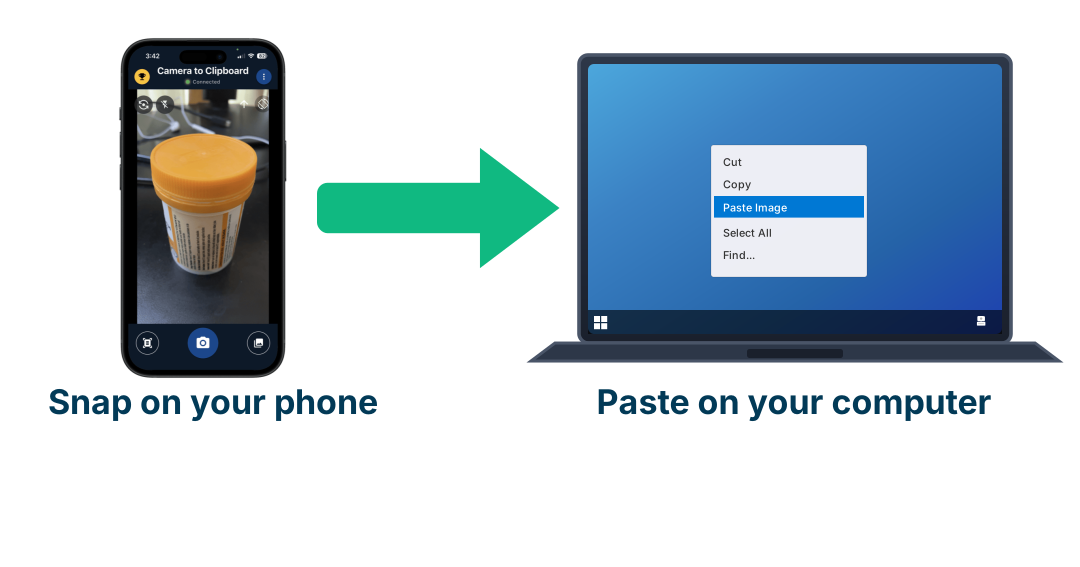
The Articles that earn citations are the how-to ones, and a how-to Article about something you built yourself needs pictures of the actual thing rather than stock photography. The awkward part is never taking the photo. It is getting the photo off your phone and into the draft sitting open on your computer. Camera to Clipboard, one of my own apps, turns that into a single step.
- A photo you take inside Camera to Clipboard is ready to paste on your computer the moment you take it. There is no emailing it to yourself, no cable and no upload to somebody else’s website in between. The phone and the computer find each other over your own local network and send the picture directly.
- Word and Google Docs take a pasted photo inline, so a LinkedIn Article can be written with its pictures already in place. Pasting into Photoshop or GIMP drops the same photo in as a new layer instead, which is where a cover image gets built. It arrives as an ordinary picture sitting on the clipboard, so anything that accepts a pasted image accepts this one.
- LinkedIn gives you no way to point a canonical tag back at your own site, so photographs of your own work are the part of the Article that is unmistakably yours. You can send several shots at once out of the phone’s library, so every picture for one Article arrives together rather than one file at a time.
Conclusion: what LinkedIn Articles do for AI citations
- A LinkedIn Article gets its own public, indexable URL, while a LinkedIn feed post sits behind a login and fades in hours. That is why Articles are the only form of LinkedIn writing worth publishing for AI visibility, and studies put them at anywhere from half to two-thirds of all cited LinkedIn content.
- LinkedIn reached around the second most-cited domain in AI answers by early 2026, yet one study found zero LinkedIn visibility on consumer questions. The citation shows LinkedIn’s URL rather than yours, and LinkedIn gives you no way to point a canonical tag back at your own page, so an Article builds LinkedIn’s authority instead of your domain’s.
- Write LinkedIn Articles only if you sell to businesses or developers, and publish them under your own name rather than the company page. Three-quarters or more of LinkedIn’s AI citations come from individual profiles and named authors. Make them genuinely useful how-to pieces, since product announcements and “thought leadership” earn close to nothing, and always link out to your own site from inside the Article. If you sell a consumer app, spend the same hour on Reddit, YouTube or your own pages.